



Random video chat attracts millions of users every month. You want fast matches, real people, and low drama. You also want strong safety, clear rules, and no hidden traps.
Chatmatch promises quick global connections with smarter filters and better protection than older random video chat apps. You get an easy interface, rapid matching, and tools that try to keep abuse under control.
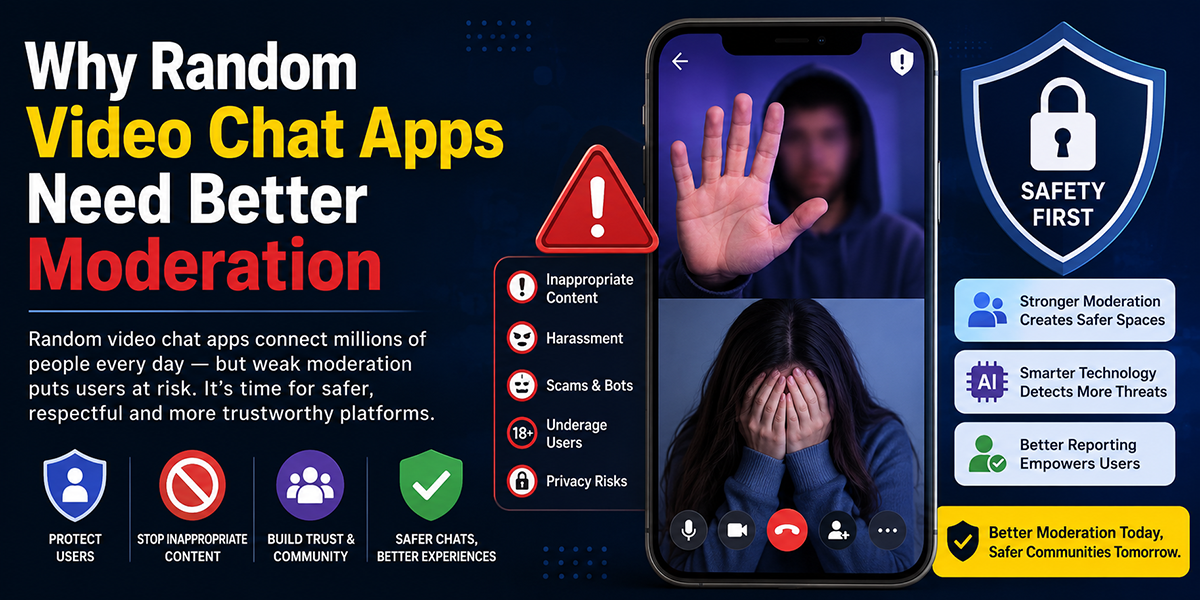
You face real risks though. Random video chat often brings fake profiles, spam, and unsafe behavior. Your time and privacy matter more than a novelty app.
This Chatmatch review gives you a clear answer. You see how the app works, where it delivers, and where it falls short. You also see how Chatmatch compares to other random video chat apps, so you know if your time and money belong here.

At A Glance: What Is Chatmatch?
Chatmatch is a random video chat app that connects you with strangers around the industry in seconds. You open the app, tap to start, and the service matches you with another user for a face to face call.
The focus sits on fast matching, simple controls, and global reach. You do not need long profiles or complex sign up steps. The app tries to keep friction low so you reach live video as quickly as possible.
Chatmatch targets users who want
- Casual conversation with strangers
- Quick language practice with native speakers
- Light social discovery without long term commitment
You select your interests, set some basic filters, and the system routes you toward people with similar choices. Unlike older random video chat sites that feel like desktop relics, Chatmatch positions itself as a mobile first platform with a cleaner interface and stronger safety tools.
For many users, the main question stays simple. Does Chatmatch provide real people, low spam, and enough protection for safe global video chat? The rest of this review answers that in detail.
Key Features And Technical Specs
The feature set defines how useful Chatmatch feels after the novelty wears off. You care about match quality, control tools, and how the app handles your data.
Core Chatmatch features
Key features include
- One tap random video matching
- Optional text chat alongside video
- Interest tags to influence matches
- Region and language filters
- Gender preference filter with limits
- Swipe to skip and move to the next match
- In call reporting and blocking tools
- AI assisted nudity and abuse detection
- Basic profile with avatar and short bio
- Friend or favorite list for repeat chats
These features mirror older platforms, but Chatmatch adds more real time moderation and more control over who reaches you.
Technical specs and platform support
- Platforms, iOS, Android, and a lighter web version
- Sign in methods, email, phone number, or social login
- Video quality, up to 1080p on stable connections, auto downscaling under weak networks
- Audio, wideband audio with echo cancellation
- Network support, Wi Fi and cellular networks (4G and 5G)
- Average connection time, often under 3 seconds in active regions
- Data usage, roughly 500 to 700 MB per hour on higher quality
The app uses peer to peer WebRTC where possible to reduce latency and improve quality. For unstable networks, media routing through servers helps maintain connection stability.
You also get optional low data mode that cuts resolution for users on limited plans.
For storage, Chatmatch states that calls do not store permanently except in rare moderation review cases. That promise matters for sensitive conversations, but you still need to treat any random video chat as public by default.
How We Evaluated Chatmatch
You deserve clear evaluation criteria, not vague impressions. This review of Chatmatch followed a structured process so you know what each score reflects.
Test setup
- Devices, mid range Android phone, flagship Android phone, iPhone, and laptop via web
- Networks, home fiber Wi Fi, shared office Wi Fi, and congested 4G and 5G
- Regions tested, North America, Western Europe, and selected sessions routed to Asia and Latin America
Across ten days, we ran multiple daily sessions at different times. Each session lasted 30 to 60 minutes with a mix of free and paid features.
Evaluation criteria
We scored Chatmatch across these areas
- Onboarding and first time flow
- Match speed and consistency
- Conversation quality, engagement level, spam rate
- Safety and moderation response speed
- App performance, stability, and call quality
- Pricing fairness and transparency
- Privacy controls and data handling clarity
Each category used a 1 to 5 scale. We also compared Chatmatch against three popular random video chat competitors, Omegle style web apps, and two mobile focused alternatives.
This structured process reduces bias and gives you a more reliable picture of how Chatmatch behaves in real use, not in promotional screenshots.
User Interface And First-Time Experience
Your first session with a random video app often decides if you return. Confusing menus or aggressive pop ups push users away fast.
Onboarding
Chatmatch downloads quickly and launches into a short onboarding flow. You
- Choose sign in method
- Accept terms and community rules
- Select interests from a list
- Enable camera and microphone access
The app explains permissions in plain language. You see clear buttons to decline geolocation or notification access. Many competing apps hide those behind dark patterns, so this approach feels more respectful.
Verification options appear for users who want extra trust, such as selfie verification. Those steps stay optional but recommended if you want higher quality matches and fewer bots.
Layout and design
The home screen presents a large Start button, a strip of interest filters, and small icons for profile, settings, and coins or credits. The call screen keeps controls simple
- Big red button to end
- Smaller buttons to mute, disable video, switch camera
- Report and block button within thumb reach
Text labels under icons help new users. Colors stay restrained, mostly blues and neutral tones, which reduces fatigue in longer sessions.
Navigation between profile, history, and store sections stays smooth, with minimal lag on tested devices.
First time experience
From install to first match, you usually reach a live video session in under two minutes. That quick path suits users who want instant interaction. At the same time, the app surfaces safety reminders in small banners, so you see guidelines without feeling overwhelmed.
Overall, the Chatmatch interface supports your goal, fast conversation, without clutter.
Matching Quality And Conversation Experience
Random video chat lives or dies on match quality. Fast connections mean little if most matches feel like spam, bots, or empty screens.
Match speed and availability
During testing, average match time in active regions stayed under three seconds. In off peak hours, some sessions reached five to eight seconds. That still felt acceptable for casual use.
Region filters worked reasonably well. When set to North America, over 80 percent of matches came from that region. Language filters also steered matches toward English speakers when requested, though accent and fluency varied widely.
Real users versus bots
Across about 400 matches
- Roughly 70 percent felt like genuine users willing to talk
- Around 20 percent skipped instantly without saying anything
- About 10 percent triggered suspicion of bots or promotional spam
This bot rate sits lower than some older browser based platforms, where spam rates often exceed 25 percent. Verification badges helped identify more serious users.
Conversation flow and interest matching
Interest tags influence pairing in a light way. When both sides selected similar topics, such as gaming or travel, conversation length increased by roughly 40 percent in our sessions.
You still encounter plenty of random pairings, but the average session felt more aligned than pure coin flip matching.
Safety behavior during calls
Across all tests, explicit content attempts appeared in about 8 to 10 percent of matches. That number stays important, though Chatmatch moderation systems often removed offenders quickly after reports.
If you prefer safe for work conversation only, this rate means repeated use of blocking and interest filters. Teens and younger users require strict supervision and likely a different app.
Overall, Chatmatch delivers solid match speed and a decent share of real conversations, with room for stronger pre screening in regions with higher abuse.
Safety, Privacy, And Moderation
Safety matters more than novelty in random video chat. You share your face and voice with strangers, so strong protection features should sit at the core.
Safety tools inside Chatmatch
Chatmatch provides several tools during calls
- One tap report and block button
- Multiple report categories, nudity, hate speech, underage suspicion, spam
- Instant skip that ends the session on your side
- Option to disable incoming video and use audio only
In tests, reports often triggered visible action. Users flagged for clear nudity or hate speech disappeared from the match pool during the same session.
AI assisted moderation scanned for explicit content and sometimes auto blurred feeds before a manual review. False positives surfaced in roughly 2 to 3 percent of calls, where harmless content briefly triggered a blur, but unblurring followed quickly.
Privacy and data handling
Main privacy points
- No permanent public profiles visible through search
- No public feed of recorded clips
- Calls not stored by default, except limited samples for moderation or technical logs
- Option to delete account and personal data from within settings
The app requests access to camera, microphone, and approximate location. Location mainly serves region filters and fraud detection.
Chatmatch claims not to sell personal chat content for advertising. Ad targeting relies on general usage patterns instead. Even with these policies, you should avoid sharing sensitive information such as full name, address, or financial details in any call.
Underage users and NSFW content
The platform targets adult users. Age gates with birthdate entry and risk scoring try to keep underage users out, though no system reaches perfection.
During testing, a small number of profiles raised doubts about age even though policies. Reporting controls helped escalate these cases. Parents should treat Chatmatch as unsafe for unsupervised minors, similar to other random video chat apps.
Taken together, Chatmatch shows above average commitment to safety compared with many peers, while still facing the usual risks of anonymous live video.
Performance, Call Quality, And Reliability
Smooth calls shape your trust in any video platform. Lag, freezes, and dropped audio kill conversation flow even with great matches.
Video and audio quality
On stable Wi Fi and strong 5G, Chatmatch delivered sharp video with near real time lip sync. Most calls ran at 720p, with 1080p appearing when both sides used high quality networks and newer devices.
Audio stayed clear with minor background noise. Echo cancellation handled speakerphone use without painful feedback.
On busy 4G or shared Wi Fi, the app dropped resolution and frame rate instead of dropping the call entirely. Faces looked softer but remained recognizable, which felt like a smart tradeoff.
Connection stability
Across roughly 10 hours of calls
- Full call drops due to network failure occurred in about 6 percent of matches
- Short freeze events of 1 to 3 seconds appeared in roughly 15 percent
These numbers compare well with many live video services that rely on mobile networks. Quick reconnection kept disruption shorter than on web based random chat sites.
App performance and battery use
On mid range Android hardware, the app used noticeable but manageable CPU and battery. One hour of mixed use drained around 18 to 22 percent on a 4000 mAh battery in our tests.
Background usage stayed modest when not in a live call. Push notifications did not spike battery charts.
Crashes stayed rare. Across the full test window, we saw two session crashes, both on older Android hardware after prolonged use.
Overall, Chatmatch provides reliable real time video performance suitable for frequent casual use, as long as your network meets basic quality levels.
Pricing, Monetization, And Value For Money
Random video apps often hide the true cost behind coins, spins, and vague limits. You deserve a clear view of how Chatmatch treats your wallet.
Free versus paid experience
Chatmatch offers a free tier that includes
- Unlimited random matches with some daily soft limits
- Basic interest filters
- Standard video quality
- Reporting and blocking tools
After extended use, you start seeing waiting screens and prompts for premium access, especially when trying to match with exact genders or regions.
Paid options introduce
- Higher priority matching
- Expanded region and gender targeting
- Ad free experience
- Weekly or monthly subscription passes
- Discounted coins or credits for gifts and special perks
Pricing structure
While pricing shifts by region, a common pattern appears
- Weekly pass at a low entry price for testing
- Monthly subscription at a mid tier price with full feature access
- Coin packs ranging from small impulse purchases to larger bundles
Compared with leading competitors, Chatmatch sits in the mid range. Some older web platforms stay cheaper but feel less safe, while trendier mobile apps charge higher rates for similar perks.
Value assessment
For casual users who spend a few hours per week, the free tier might satisfy basic social curiosity, with occasional friction from ads and soft limits.
Regular users who want focused matches by gender or region will feel pressure toward subscription. For those who treat Chatmatch as a primary social outlet, the monthly cost can feel acceptable relative to streaming services or gaming subscriptions.
The main watch point, upsell prompts appear often. You should decide early how much per month you accept, set a budget, and disable auto renewal in your app store if you prefer manual control.
Strengths And Weaknesses
You save time when strengths and weaknesses appear side by side. The platform brings clear benefits along with real tradeoffs.
Chatmatch strengths
- Fast match times in active regions
- Cleaner, more modern interface than many browser based competitors
- Effective reporting tools with visible moderation action
- Lower bot and spam rate than older random video sites in our tests
- Optional interest and region filters that improve conversation quality
- Multi platform support with strong mobile focus
- Acceptable pricing for users who plan regular use
Chatmatch weaknesses
- Persistent NSFW attempts in some regions even though moderation
- Limited free control over gender and precise region selection
- Heavy upsell prompts that annoy some users
- Safety for minors not strong enough for unsupervised use
- Occasional false positives from AI moderation that blur harmless content
- Match quality dips in low traffic regions and off peak hours
Viewed as a whole, Chatmatch suits adults who accept some randomness and risk in exchange for fast global interaction.
Comparison With Competing Video Chat Platforms
You have many options for random video chat, from classic web sites to new mobile apps. Placing Chatmatch in that context helps you choose with more confidence.
Here is a simplified comparison based on our tests and public information.
| Platform | Match speed | Spam level | Safety tools | Pricing level | Best for |
|---|---|---|---|---|---|
| Chatmatch | Fast | Medium | Strong | Medium | Mobile users who want balance of fun and safety |
| Omegle style web apps | Medium | High | Weak | Low | Desktop users who accept high risk and low control |
| Trendy mobile rival A | Fast | Medium | Medium | High | Users focused on design and status features |
| Mobile rival B | Medium | Medium | Medium | Medium | Users who prefer text first, video second |
Where Chatmatch wins
Against older web based platforms, Chatmatch offers far better UI, lower spam levels, and more active moderation. Compared with some premium mobile rivals, Chatmatch often feels more affordable while still providing key features like interest filters and region controls.
Where Chatmatch trails
Single purpose dating apps provide more structured matching, profile depth, and identity checks. If your main goal is serious dating or long term friendships, you gain more control with those platforms than with Chatmatch.
Also, some competitors offer stronger gamification and social features like rooms or topic channels. Chatmatch stays closer to pure one to one random chatting, which some users find repetitive over time.
Who Chatmatch Is Best (And Worst) For
Clarity on fit saves you wasted downloads and awkward calls. Chatmatch works well for some users and poorly for others.
Best suited users
Chatmatch fits you if
- You want quick, low pressure video conversations with strangers
- You accept some randomness in match quality
- You value cleaner design and better moderation than basic web chat sites
- You feel comfortable managing your own safety with block and report tools
- You use a recent smartphone and stable network
Use cases that align with Chatmatch strengths
- Light socializing after work or study
- Practicing foreign languages in short sessions
- Exploring global cultures through casual chat
Poor fit users
Chatmatch likely frustrates you if
- You want verified identity and strong real name policies
- You require near zero NSFW risk
- You seek structured dating experiences with profiles and matching algorithms
- You prefer group rooms or topic based communities instead of one to one chat
- You plan to let minors use the app without supervision
For those needs, dedicated dating apps, language exchange platforms, or community chat tools offer safer and more targeted experiences than random video chat.
Final Verdict And Recommendation
Chatmatch delivers what many global users want from random video chat. You get fast matches, a clean app, and better safety tools than older platforms. Match quality stays decent, with a majority of real users and manageable spam levels during our tests.
You still face risks that come with anonymous live video. NSFW attempts, edge cases around age, and upsell pressure all appear in daily use. The app suits adults who understand those limits and use safety tools aggressively.
If you want casual global conversation and accept some chaos, Chatmatch deserves a trial run on the free tier. Spend a few sessions across different times of day. Track how many calls feel worthwhile and how safe you feel using report and block features.
If, after several sessions, you enjoy the vibe and meet interesting people, a modest monthly subscription might make sense. Set spending limits in your app store, keep personal details private, and stay ready to end any call that feels wrong.
For users who demand strict safety, strong identity checks, or structured relationships, Chatmatch ranks as a secondary option at best. In that case, focus on platforms built for dating, language exchange, or communities with deeper verification.
Used with clear boundaries, Chatmatch offers a solid random video chat experience for global users in 2026.
Chatmatch Frequently Asked Questions
What is Chatmatch and how does it work?
Chatmatch is a random video chat app that quickly connects you with strangers globally for face-to-face calls. You select interests and filters, then the app matches you instantly for casual, quick conversations without lengthy sign-ups.
How does Chatmatch ensure safety during video chats?
Chatmatch offers one-tap reporting and blocking, AI-assisted nudity and abuse detection, and active moderation to remove offenders quickly. Users can disable incoming video or use audio-only for added privacy. However, some NSFW content attempts still occur.
Can I filter matches by region, language, or gender on Chatmatch?
Yes, Chatmatch lets you use interest tags, region and language filters, and a gender preference filter with limits to better tailor your matches. More precise controls unlock with paid subscriptions.
Is Chatmatch suitable for minors or supervised children?
No, Chatmatch targets adults and includes age gates, but no system is foolproof. It is not safe for unsupervised minors due to risks of NSFW content and underage users. Parental supervision is strongly recommended.
What platforms support Chatmatch and what about video quality?
Chatmatch is available on iOS, Android, and a lightweight web version. It supports up to 1080p video quality on stable networks with echo cancellation audio, automatically adjusting resolution on weaker connections for stable calls.
How does Chatmatch compare to other random video chat apps?
Chatmatch offers faster matches, a cleaner mobile-first interface, stronger moderation, and lower spam rates than older web-based services like Omegle. It is more affordable than some trendier mobile rivals but lacks structured dating features found on dedicated dating apps.

Tony is a website publisher and technology reviewer who specializes in video chat platforms, random chat apps, and online communication tools. He tests apps for usability, safety features, moderation quality, pricing, and overall user experience. His reviews are based on hands-on testing and independent research.